Cross-unit ROI Comparison
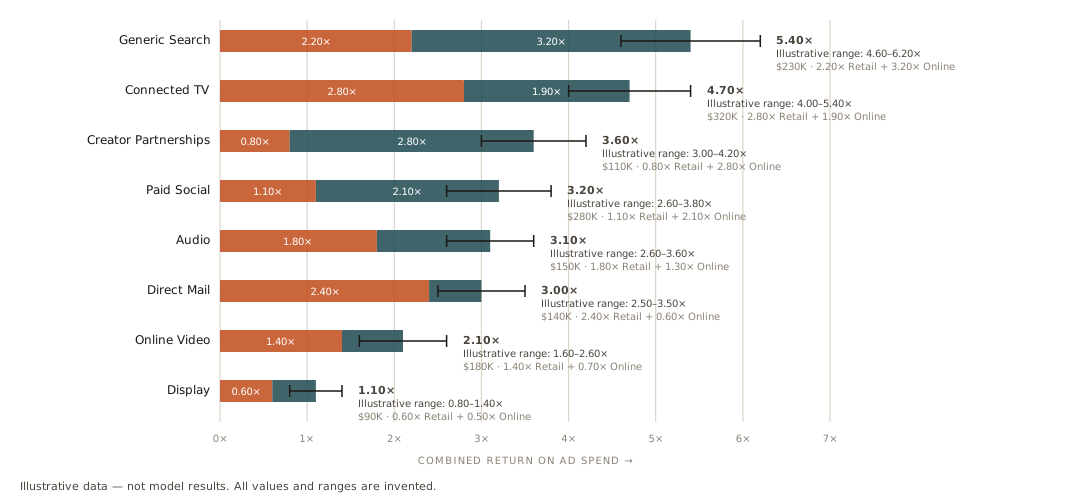
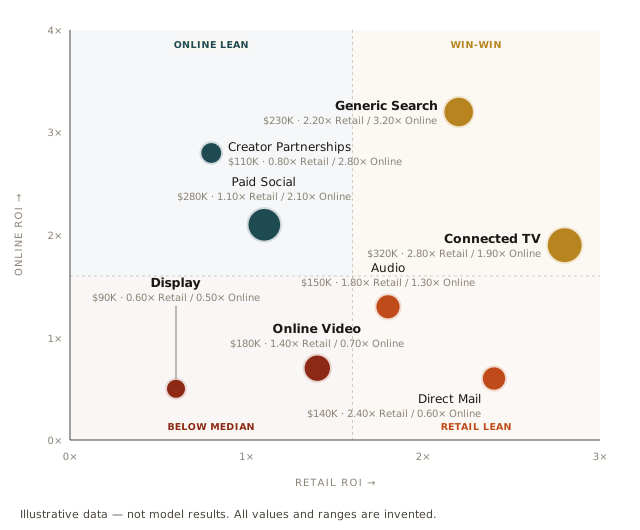
See how channel returns add up across two business units, and which channels perform relatively well on one unit or both. Build the report through the Recast MCP.
Download the .skill package and upload it in Claude’s Skills settings. It includes Markdown instructions and both Python helpers; keep them together. Connect the Recast MCP and enable code execution, then use the prompt above. No API key is included or needed in the download.
Supports two ROI models with compatible, non-overlapping revenue outcomes and the same spend base. CPA models are not supported. Combined credible intervals require a verified aggregate; the example’s invented ranges only demonstrate the display. “Win-win” means at or above both channel medians, not a budget recommendation.